


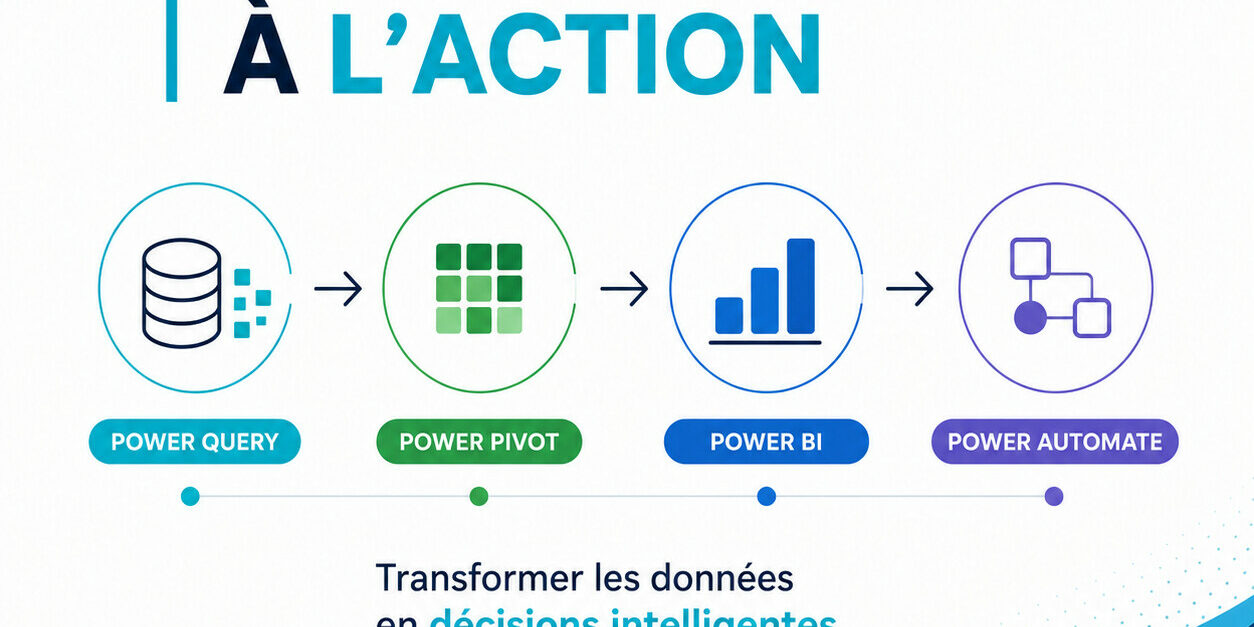
1. Power Query : Prepare and clean data
Power Query is Microsoft’s data connection and preparation technology, integrated into Excel and Power BI.
It allows you to:
- Connect to multiple data sources
- Combine datasets
- Clean and transform data
- Automate all preparation steps during refresh
Especially useful when data comes from multiple or inconsistent sources. Benefit: improves data reliability before analysis
2. Power Pivot : Structure and analyze
Power Pivot is a data modeling tool integrated into Excel.
It allows you to:
- Create relationships between tables
- Work with large datasets
- Perform advanced calculations using DAX
👉 It transforms data into a structured analytical model.
✅ Benefit: enables deeper, more powerful analysis.
3. Power BI : Visualize and share
Power BI is a business intelligence platform for:
- Creating interactive dashboards
- Visualizing key indicators
- Sharing insights across the organization
👉 It turns data into clear, actionable insights.
✅ Benefit: supports better and faster decision-making
4. Power Automate : Take action automatically
Power Automate connects your tools and automates workflows.
It allows you to:
- Trigger actions based on events
- Create automated workflows (flows)
- Connect Microsoft tools and external apps
👉 Example:
When a form is submitted → save the data → send an alert → update a list
✅ Benefit: moves from analysis → to action without manual effort
4.1 Power Automate with Microsoft 365
Within the Microsoft 365 environment, Power Automate can be used with Excel, SharePoint, Teams, Planner, Forms, and other services to automate repetitive tasks. It becomes possible to trigger an action when a file is added, when a row is modified, or when a form is submitted.
4.2 Power Automate with Power BI
Power Automate can also be integrated with Power BI through a dedicated visual. This allows users to trigger a flow directly from a report, taking into account the context selected in filters or visuals.
For example, a manager can, directly from a report, create a SharePoint item, send an approval request, or notify a team based on a specific region, client, or time period.
5. The overall connection: a complete chain from data to action
In organizations, the most common scenario can be summarized as follows:
- Power Query prepares the data
- Power Pivot structures the model in Excel, or an equivalent logic is implemented in Power BI
- Power BI transforms the data into actionable insights
- Power Automate triggers the necessary actions
This complementarity makes it possible to move from a dashboard that simply informs to a system that genuinely supports action.
 “We spend too much time preparing data”
Are you copying and pasting, cleaning, and repeating the same steps every week?
With Power Query:
- automated data preparation
- consolidation of multiple sources
- one-click refresh
✅ Result: fewer errors, more time for analysis
“Our analyses are limited or hard to scale”
Are your files becoming complex, unstable, or difficult to maintain?
With Power Pivot:
- structured data model
- relationships between tables
- reliable, repeatable metrics
Result: a solid foundation for consistent decision-making
“Information doesn’t flow well across the organization”
Are reports being sent by email or stored in multiple versions?
With Power BI:
- interactive dashboards
- centralized access
- secure sharing across teams
Result: everyone works with the same indicators
“We analyze… but we don’t take action”
Even with good dashboards, are actions still manual?
With Power Automate:
- automated action triggers
- notifications, approvals, follow-ups
- integration with Microsoft 365 (Teams, SharePoint, Outlook…)
Result: you move from analysis to execution